ZoomOn on Android TV: A Smarter Way to Start With Home Security
- 11. 12. 2025 10:18
- SHARE


As our homes get smarter, the ways we protect them are evolving too. And today, we’re excited to share with you a major step forward: The ZoomOn app is now available on TVs and boxes with operating system Android TV!
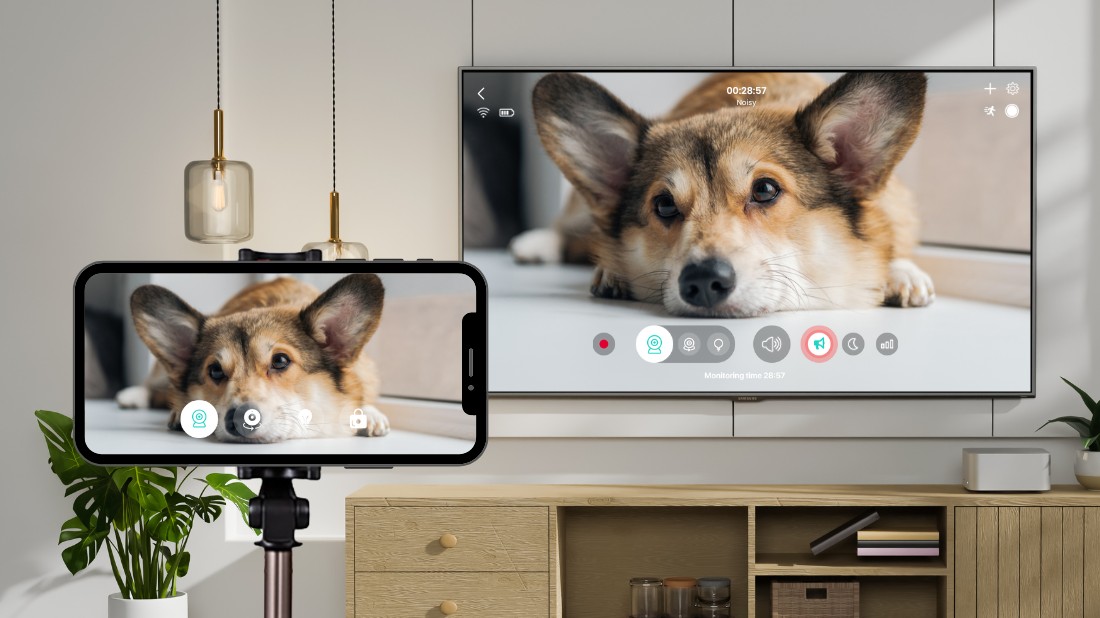
This means you’re no longer limited to checking your home only from a phone or tablet – you can now watch everything directly on your TV screen. Whether you’re using ZoomOn as a phone or a security camera, monitoring your baby, or checking in on pets, the experience is now more comfortable and flexible than ever.
If you’ve been looking for an easy way to turn your phone into a security camera and start with home security using devices you already own, this update makes it even simpler.
More Devices, More Possibilities
ZoomOn has always been known for its flexibility – you can turn almost any spare device into a home camera or monitor. With Android TV support, you now have even more options to build your setup:
- Android phones
- iPhones
- Android tablets
- iPads
- Mac computers
- Android TV & Android TV boxes
As long as you have an unused device at home, you can most likely use it with the ZoomOn app – no need to purchase extra hardware!

Key Monitoring Features on Android TV
Android TV supports the essential monitoring features you need for everyday home security:
- HD Live Video – clear, real-time viewing
- Night Mode – a green filter that brightens and enhances low-light scenes
- Sound – hear what’s happening in the room
- Alarm – trigger a loud alert on the camera device
- Audio Activity Chart – a simple visual graph showing when louder moments occurred
Everything important for home monitoring is right on your TV screen.
How to Pair ZoomOn With Android TV
Here’s how to set it up:
- Install the ZoomOn app on both your Android TV and the device you want to use as the security camera (phone, tablet, or Mac).
- Open the app on both devices.
- On your TV, choose “Pair my phone”.
- On your camera device, choose “Pair my phone”.
- Complete pairing by scanning the QR code on your TV or entering the numeric code manually.
Within seconds, your TV becomes a hands-free home monitor.
▶️ Watch our short tutorial to learn how to pair two devices:
When Monitoring Through Your TV Makes Sense
Watching your live feed on a TV may sound simple, but in everyday life, it can be surprisingly helpful:
1. Keeping an eye on your sleeping baby
Having your baby’s room on the TV adds a little extra peace of mind. You can relax, cook, or finish small tasks while simply glancing at the screen to see if your baby is still asleep or starting to wake.
2. Checking on your dogs or cats
Dogs and cats have their own routines – and the occasional adventure. With the video on your TV, you can quickly see what your pets are doing while you relax or get things done around the house.
3. Watching entryways during busy moments
When you’re expecting a package or have a lot happening at home, it’s helpful to have the entryway on your TV. You can keep up with what’s going on just by glancing over, without stopping whatever you’re doing.

Final Thoughts: A Bigger Screen for Peace of Mind
With ZoomOn now available on Android TV, home monitoring becomes more natural, accessible, and comfortable. Whether you’re watching over your baby, keeping track of your pets, or simply making your home feel safer, using your TV as a monitor fits seamlessly into everyday life.
No extra equipment. No complicated installation. Just smart home security built from the devices you already have.
Sometimes the simplest solutions become the most powerful – especially when they’re already in your home.
FAQs: Watching Your Home on Android TV
Can I use ZoomOn on any Android TV device?
Yes! Most Android TV televisions and boxes support the ZoomOn app via the Google Play Store.
Do I need special equipment to monitor on TV?
No. Install ZoomOn on both your TV and your phone, then pair them using a QR code or a numeric code.
Is the video quality the same on Android TV?
Yes! You can view HD live video, hear sound, and use the alarm feature just like on mobile devices.
Is Night Mode true night vision?
No. ZoomOn’s night mode feature isn’t infrared night vision. It uses a green filter to enhance brightness and contrast, helping you see better in low-light scenes, but it won’t brighten completely dark rooms.
Can I combine different types of devices with ZoomOn?
Yes! ZoomOn is fully cross-platform, so you can use any combination you like – for example, an iPhone as the security camera and a Mac as the monitor. You’re free to pair whichever devices you already have at home.
- 11. 12. 2025 10:18
- SHARE
